Datto BCDR
Datto BCDR Integration
Datto BCDR (SIRIS, ALTO, and NAS appliances) provides image-based backup, local virtualization, and cloud disaster recovery. This integration imports appliances, protected agents, backup job status, and alerts from the Datto Partner Portal into Narmada.
Key Features
- Sync Datto appliances as backup-appliance assets per client
- Import protected agents (servers / endpoints) linked to their appliance
- Track last local backup, last offsite sync, and screenshot verification status
- Surface appliance alerts (offline, failed backup, low storage)
- Show local + cloud storage usage and warranty expiry on the asset record
Prerequisites
- Datto Partner Portal account with administrator access
- REST API enabled for your partner tenant
Step 1 — Generate API credentials in the Partner Portal
- Sign in to the Datto Partner Portal.
- Go to Admin > Integrations > REST API.
- Click Generate new key.
- Copy the Public Key and Secret Key immediately — the secret is shown only once.
Map client in the integration settings and run a Sync.
Once data is synced, you can add the Datto BCDR card on the Presentation Dashboard/Report template
Step 2 — Connect Datto BCDR in Narmada
- Open Settings > Integrations and click Add integration.
- Select Datto BCDR.
- Paste the Public Key and Secret Key. Leave the Base URL on its default unless Datto support has given you a different endpoint.
- Click Test connection. A green check confirms the credentials work.
- Click Save.
Step 3 — Map appliances to clients
- Open the connection and go to the Site Mapping tab.
- Each Datto appliance is listed by its client / company name. Map every appliance to the matching Narmada client.
- Click Save mappings. Only mapped appliances will have their data synced.
Tip: if an appliance appears as a serial number instead of a client name, set the Client / Company name on that device in the Datto Partner Portal and refresh the site list.
Sync schedule
Datto BCDR runs on Narmada's global 5-minute integration scheduler. You can also trigger an on-demand run with Sync now from the connection page.
What gets synced
- Appliances → backup-appliance assets (model, serial, firmware, local + offsite storage, warranty)
- Protected agents → endpoint assets linked to their parent appliance
- Backup jobs → last local backup, last offsite, screenshot verification status
- Alerts → device offline, failed backup, storage threshold
You can see synced data on the Assets app as list of agents backed up
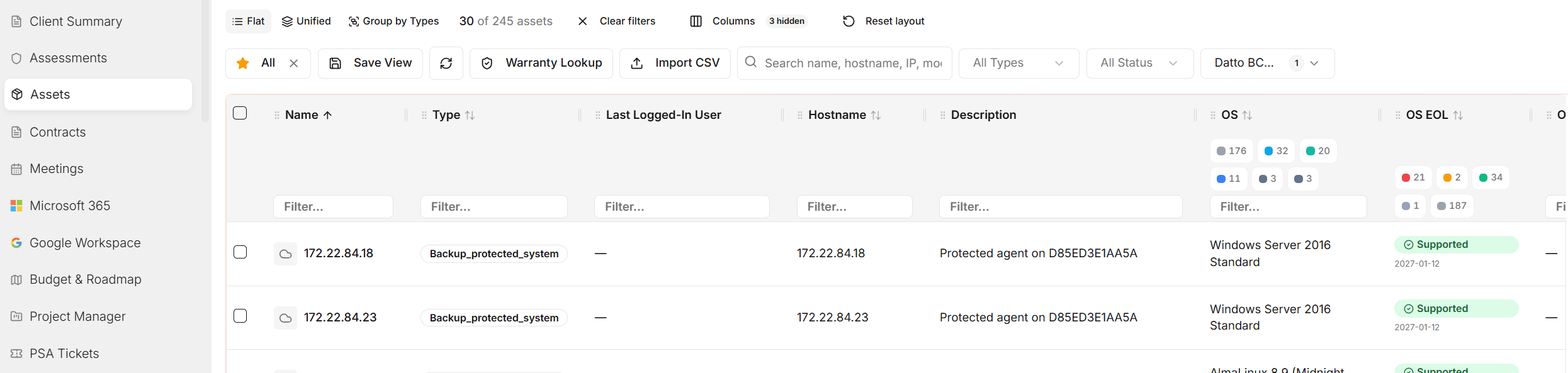
as well on the Dashboard/Report widget/card you can add to any of your templates
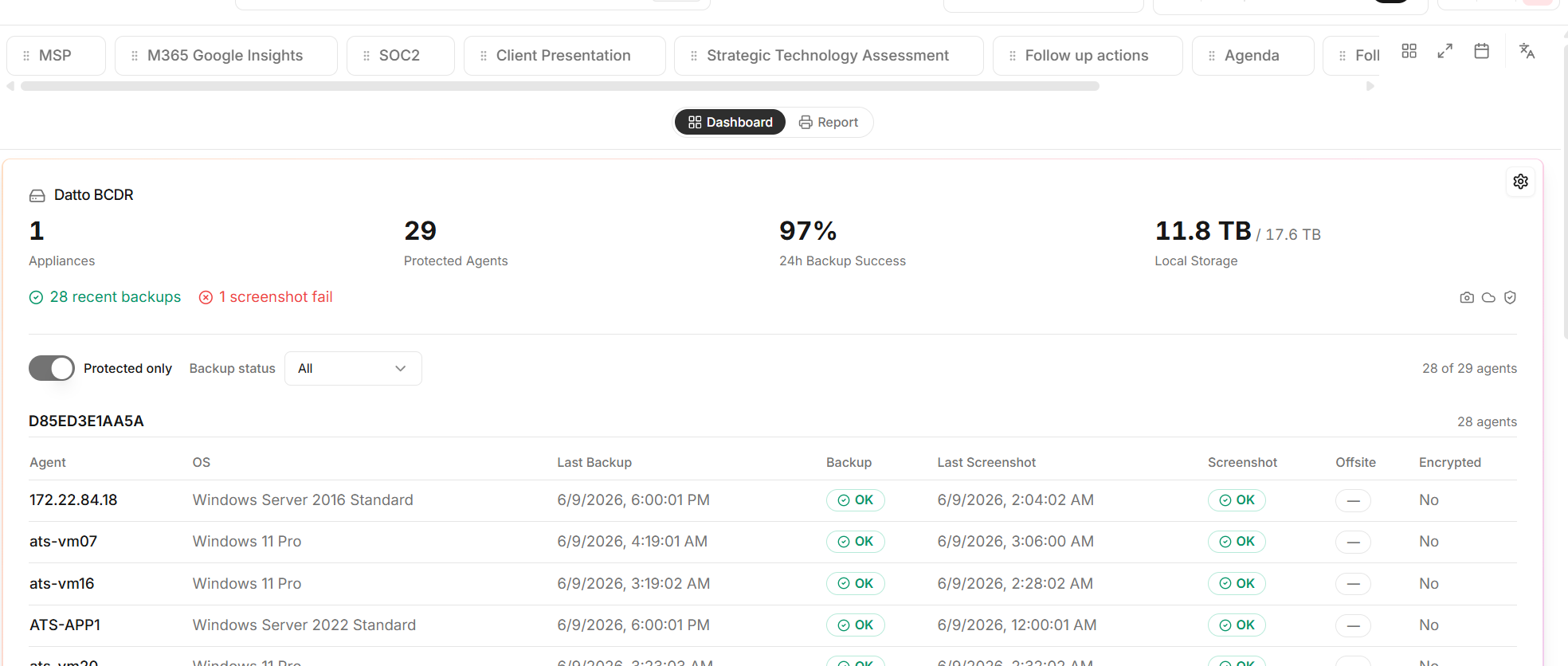
Troubleshooting
- 401 / 403 on test — Public or Secret Key was mistyped or has been revoked. Generate a fresh key pair.
- No appliances listed — The API key''s partner tenant has no devices, or the key was scoped to a sub-account that excludes them.
- Appliances showing as serial numbers — The device has no Client / Company name in the Partner Portal. Set it there, then re-sync.
- Sync stuck — Check Settings > Integrations > Sync history for the last error message and re-run with Sync now.